
About: An MPEG Transport Stream can contain multiple packetized elementary streams (PES). Each of these packets has an identifier (PID). Stream mapping is intended to control where these packets are going. In Live Video Cloud, you can assign new identifiers to these stream packets and decide which PES to keep or remove from the stream. Stream mapping is an optional setting of your output configuration.
Not sure how to start?
→ Learn how to create outputs.
→ Learn more about MPEG transport streams.
Anatomy of a mapping
Empty mapping entry
A mapping entry consists of two parts: an identification for an incoming packet (incoming) and a command or target (outgoing):

Incoming
Dynamic or static identification of a stream packet:

- Descriptive: Enumerative basis of the elementary stream packets (e.g., “first video” means the video stream with the lowest PID as defined in the first PMT).
- PID-based: The identification number of the packetized elementary stream.
Outgoing
A command or target PID:
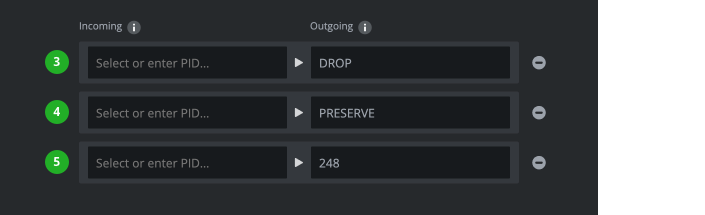
- Drop: Removes a packetized elementary stream.
- Preserve: Keeps a packetized elementary stream (PID remains unchanged if the distribution protocol supports it).
- Target PID: Assigns a new identifier (PID) for an incoming PES as it leaves a Live Video Cloud output.
Rule for unmapped streams
Additionally, a rule regarding all the unaddressed streams has to be set up: DROP or PRESERVE. When stream mapping is enabled, each PES not referenced in a mapping is considered unmapped.

Stream mapping & overrides
Stream mappings can be configured to apply to an output and with all its destinations and resource locations or only individual destinations or resource locations.
Stream mapping tab
Mappings that have been configured in the "Stream Mapping" tab of an output are applied to all resource locations and destinations of the respective output.
Overrides for resource locations and destination
On each destination and resource location an override can be enabled and configured. Stream mapping overrides ignore the configuration in the stream mapping tab entirely.
How to continue?