
About: Enter SMTP credentials and a list of email addresses to be notified in cases of system failures. Alerting allows you to receive alert messages if:
- Activated destinations are not working/in an error state — e.g., because the destination ingest server is not available or is rejecting the connection.
- Storage runs low. Over 90% of the system's storage is used.
Hint: In order to use the alerting functionality you need to have an external SMTP server and email account in place. LTN Schedule uses the provided external email server to send notifications to the entered email addresses in the alerting field.
Not sure how to start?
→ Learn about general settings.
Alerting configuration
To add automatic email alerting configure the related section in general settings:
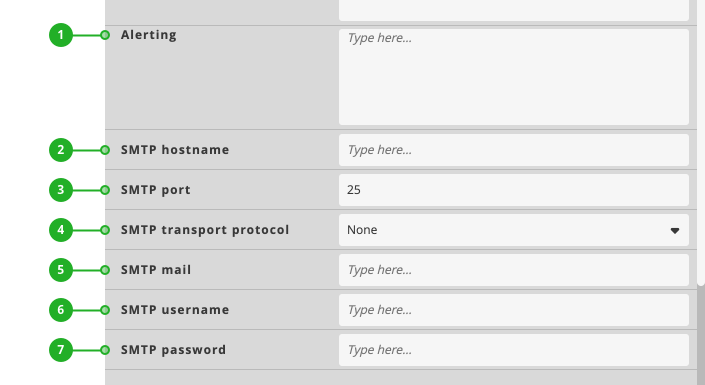
- Alerting: Enter an email address to get notified. Enter multiple email addresses as comma separated list.
- SMTP hostname: Enter the STMP hostname to be used to send email notifications.
- SMTP port: Enter the STMP port.
- SMTP transport protocol: Select TLS or SSL as communication method.
- SMTP mail: Enter the sender email address.
- SMTP username: Enter the related username.
- SMTP password: Enter the related password.