
About: Resource locations and destinations are pull and push distribution methods of live signals. They can be activated and deactivated individually before or while an output is running.
Not sure how to start?
Turn on/off resource locations and destinations
Resource locations and destinations can be turned on/off via the outputs view, output inspector, or output dialog.
Output view
The output view provides the best overview of an output’s status and direct control options.
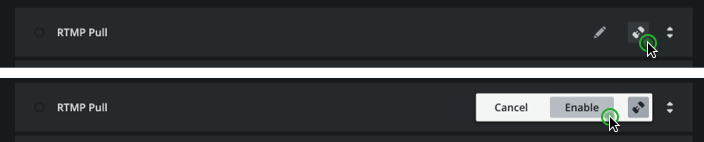
- Go to outputs.
- Select your output.
- Click on the “Connect” or ”Disconnect” button of the resource location or destination.
- Confirm your action by pressing "Enable" or "Disable".
→ Learn more about output monitoring and control.
Output inspector
The output inspector allows you to control resource locations and destinations from anywhere an output is available.

- Go to productions or route view.
- Select your output.
- If closed, open the expandable for either resource locations or destinations.
- Place your mouse on the element you want to turn on/off.
- Click on the “Connect” or ”Disconnect” button of the resource location or destination.
- Confirm your action by pressing "Enable" or "Disable".
→ Learn more on inspecting outputs.
Output configuration
If you want to double-check your output’s and destination’s settings, use the configuration dialog.
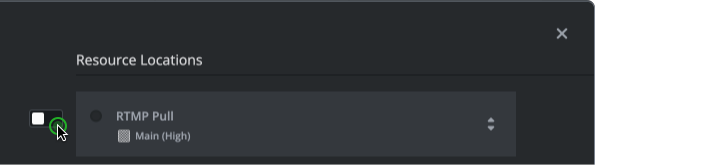
→ Learn more on configuring outputs.
- Edit your output.
- Go to "Resource Locations" or "Destinations".
- Activate or deactivate the switches next to the resource location or destination.
- Save the configuration.
Behavior
Resource locations
Turning on a resource locations allows pull clients to use the provided credentials to receive a signal. The change is immediate.
Turning off a resource location disallows pull clients from using provided credentials to receive a signal and will disconnect existing pull connections. The change is immediate.
Destinations
Turning on a destination starts live distribution to the configured destination. The change may require a couple of seconds until a signal is received.
Turning off a destination stops live distribution immediately.