
About: HLS pull inputs allow ingesting live signals from HLS sources. If the source manifest provides multiple qualities only the highest quality is selected for ingesting.
Not sure how to start?
→ Learn where to create a new input or edit an existing input.
Prepare
To configure an HLS pull input in Live Video Cloud you will need the manifest URL provided by your source.
Example of a manifest URL:
https://mydomain.com/path/master.m3u8
Configure an HLS pull input
Section 1: Configuration
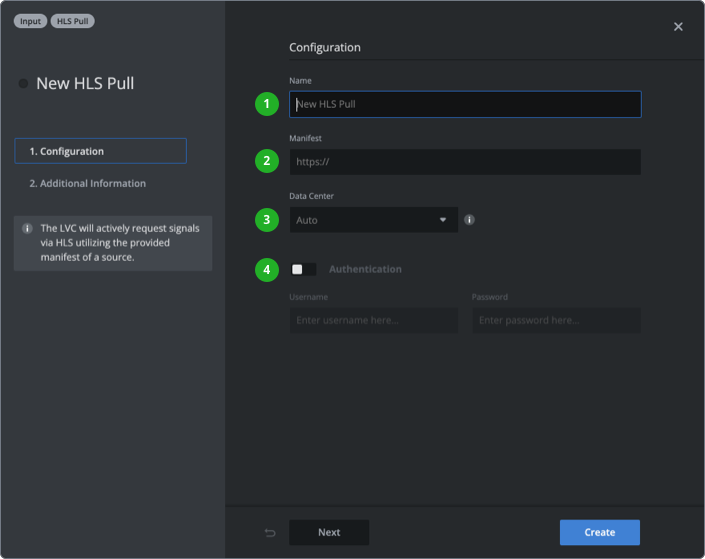
- Type in a name that will be used as a unique identifier across your Live Video Cloud team.
- Enter the manifest URL provided by your source.
- Choose a data center or leave it on "Auto" to use the data center of the assigned production.
- (Optional) Enable authentication and enter username and password.
Section 2: Additional information
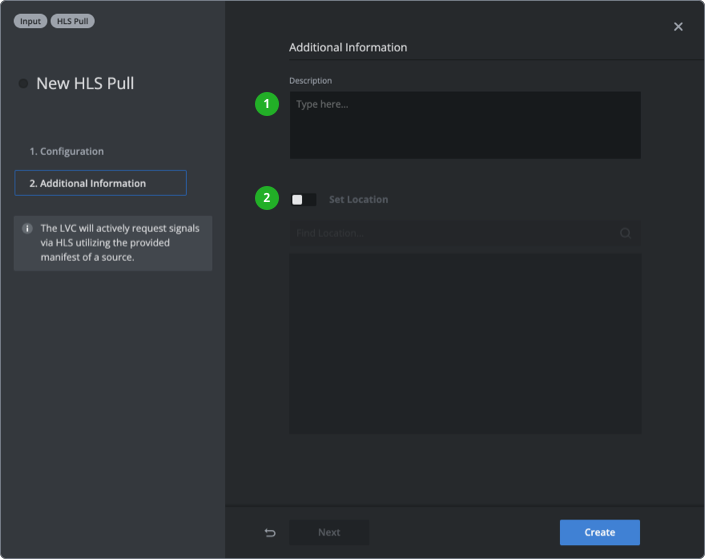
- (Optional) Add a description to provide further information.
- (Optional) Enable "Set Location" and enter a location to your input.
Press “Create” or ”Save Changes” in the bottom right corner.
How to continue?
→ Learn how to set up productions.
→ Learn how to start productions.