
About: RTSP pull inputs allow ingesting live signals from RTSP sources.
Not sure how to start?
→ Learn where to create a new input or edit an existing input.
Prepare
To configure an RTSP pull input in Live Video Cloud you will need the URL provided by your source.
Format of a URL:
rtsp://{user}:{pass}@{address}:{port}{path}
Configure an RTSP pull input
Section 1: Configuration
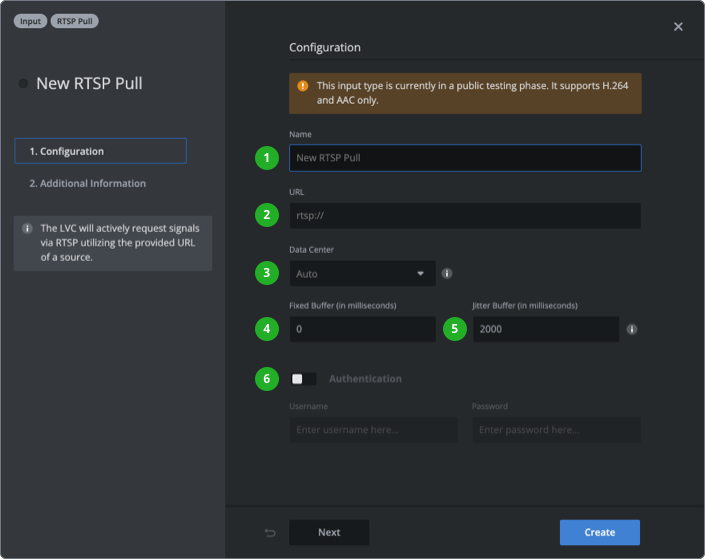
- Type in a name that will be used as a unique identifier across your Live Video Cloud team.
- Enter the URL provided by your source.
- Choose a data center or leave it on Auto to use the data center of the assigned production.
- Set fixed buffer size or keep the default value. The fixed buffer increases latency and is used to compensate for fluctuating network/bitrate conditions.
→ Learn when to use a custom fixed buffer size. - Set jitter buffer size or keep the default value. A jitter buffer is a temporary storage buffer used to capture incoming data packets to ensure continuity of streamed signals.
- (Optional) Enable authentication and enter username and password.
Section 2: Additional information
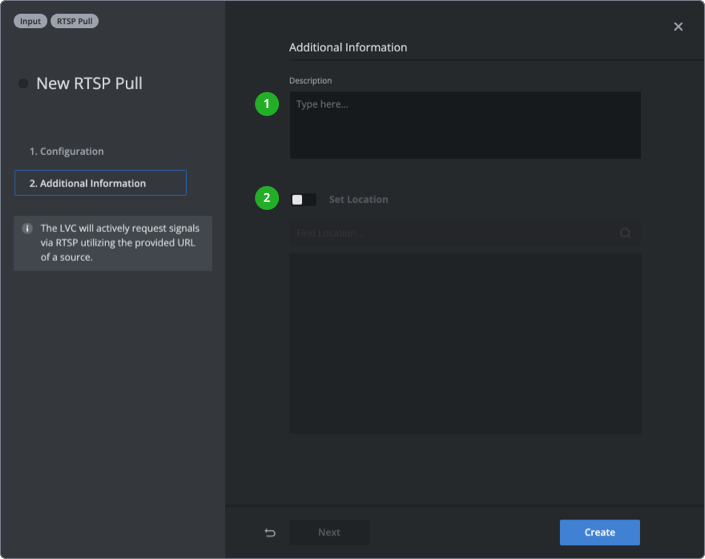
- (Optional) Add a description to provide further information.
- (Optional) Enable "Set Location" and enter a location to your input.
Press “Create” or ”Save Changes” in the bottom right corner.
How to continue?