
About: Live streams in the library and the rundown can be edited via the edit button in the inspector to change the original configuration or to add a graphical overlay.
Not sure how to start?
→ Learn how to create a live stream
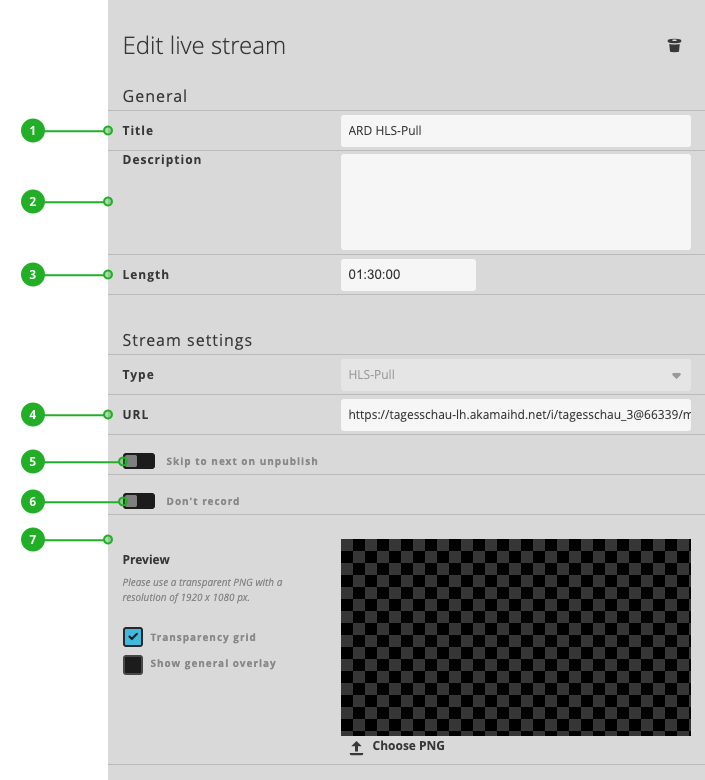
Edit live stream
Live streams can be edited after they’re used within the Schedule rundown.
A few new individual settings are configurable here:
- The name
- Description
- Duration of the live stream
- Live stream URL
- Skip to next on unpublish: If this switch is activated, Schedule will skip — after the defined time (seconds) — to the next element of the rundown when the live stream becomes unavailable / or is unpublished actively from the sender. If the stream is coming back within the defined time (seconds) Schedule will not skip.
- Don’t Record: If this option is activated, Schedule is not recording the live stream within the “Recorded live streams” Library-Folder. The default behavior (record on/off) can be configured within the general settings dialog.
- Adding a graphical overlay
How to continue?