
About: Send HLS playlists and segments via http pull to HLS servers such as CDNs.
Not sure how to start?
→ Learn to create destinations.
Create an HLS pull destination
To create an HLS pull destination, modify your destinations, add a new destination and follow the instructions below:
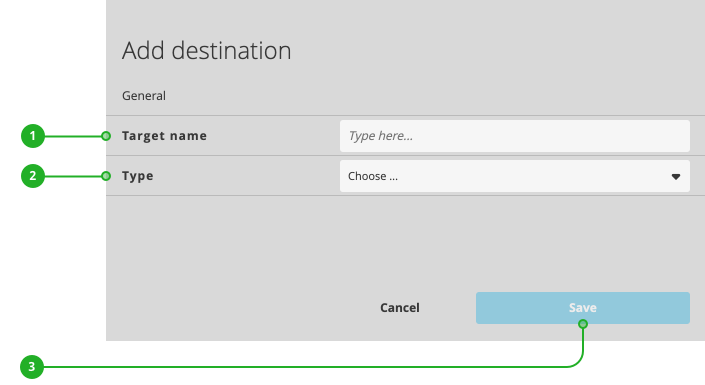
- Enter a name.
- As type, select "HLS pull".
- Click "Save".
Continue your configuration in the new dialog appearing:
- Enable/Disable: Activates or deactivates the destination for publishing.
- Name: As described above, the name of your destination.
- URL: Displays the ingest URL.
- Write ad trigger as SCTE-35 markers into output: Activate to write configured events and markers from incoming live streams into the outgoing stream. In addition to the SCTE-35 markers within the actual ts-segments, the system also writes in Cue out/in markers into the m3u8 manifest and creates spice points (starts a new segment) when the SCTE marker is set. This enables you to utilize downstream content replacement workflows for e.g. dynamic ad insertion or (DAI).
m3u8 Example with starting 30 Sec. Ad-Break SCTE/Cue-out :
internal-ve-hls-pull-tgt-deb9a5e0-ac4a-41d2-82dc-9c5c5df78b85-seg0000000000020758.ts
#EXTINF:4.000,
internal-ve-hls-pull-tgt-deb9a5e0-ac4a-41d2-82dc-9c5c5df78b85-seg0000000000020759.ts
#EXTINF:4.000,
internal-ve-hls-pull-tgt-deb9a5e0-ac4a-41d2-82dc-9c5c5df78b85-seg0000000000020760.ts
#EXT-OATCLS-SCTE35:/DAlAAAAAAAAAP/wFAUAAAAAf+/+elfS7X4AKTLgAAAAAAAAC2RHBg==
#EXT-X-CUE-OUT:DURATION=30.000,K=V
#EXTINF:1.783,
internal-ve-hls-pull-tgt-deb9a5e0-ac4a-41d2-82dc-9c5c5df78b85-seg0000000000020761.ts
#EXT-X-CUE-OUT-CONT:ElapsedTime=1.783,Duration=30.000,SCTE35=/DAlAAAAAAAAAP/wFAUAAAAAf+/+elfS7X4AKTLgAAAAAAAAC2RHBg== - Use multi-bitrate: Enable this option to activate all pre defined HLS output qualities for adaptive player quality switching. Use Multi-Bitrate (ABR/MBR) HLS (Push/Pull) to CDN-Targets like Akamai/FASTLY/AWS Cloudfront, and more - including 6 output qualities over Apple HLS with frame accurate switching from quality to quality - based on the available user bandwidth. Please see technical specifications "Multi Bitrate (MBR) / Adaptive Bitrate (ABR)" section for more information. This feature is not available with all LTN Schedule Packages.
Press "Modify destination" (6) to save your changes. Your destination is now ready to use.
How to continue?