
About: Publish to Brightcove via an OAuth-connected destination to automatically update metadata or trigger ad breaks on the destination platform.
Not sure how to start?
→ Learn to create destinations.
Create a Brightcove destination
To create a Brightcove destination, modify your destinations, add a new destination and follow the instructions below:
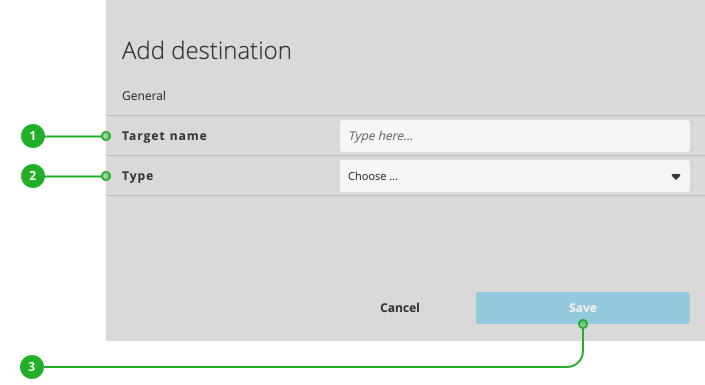
- Enter a name.
- As type, select "Brightcove".
- Click "Save".
Continue your configuration in the new dialog appearing:
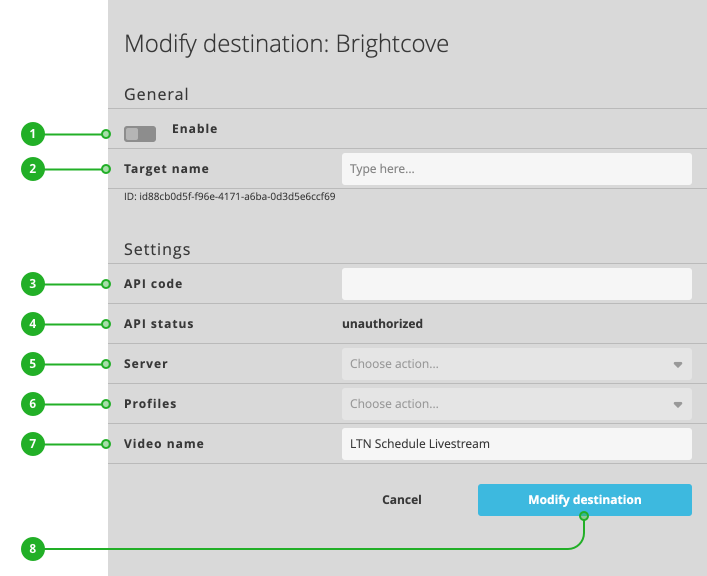
- Enable/Disable: Activates or deactivates the destination for publishing.
- Target name: As described above, the name of your destination.
- API code: Insert the API token you have received from your Brightcove contact.
→ Learn how to get a Brightcove API token. - API status: Displays the current authentication status.
- Server: Select a server close to the location of your LTN Schedule instance.
- Profiles: Select your preferred profile.
- Video name: Enter the name of your media to be used on Brightcove.
Press "Modify destination" (8) to save your changes. Your destination is now ready to use.
How to continue?
→ Learn to activate/deactivate your rundown.
→ Learn to turn on/off destinations.