
About: Publish on Facebook via an OAuth-connected destination to automatically update metadata or trigger ad breaks on the destination platform.
Not sure how to start?
→ Learn to create destinations.
1. Create a Facebook destination
To create a Facebook destination, modify your destinations, add a new destination and follow the instructions below:
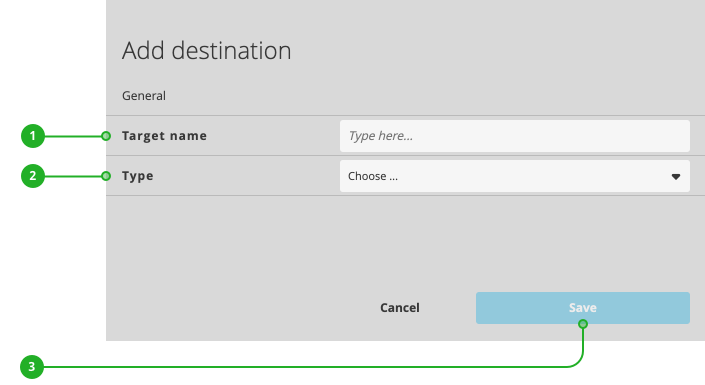
- Enter a name.
- As type, select "Facebook".
- Click "Save".
Continue your configuration in the new dialog appearing:
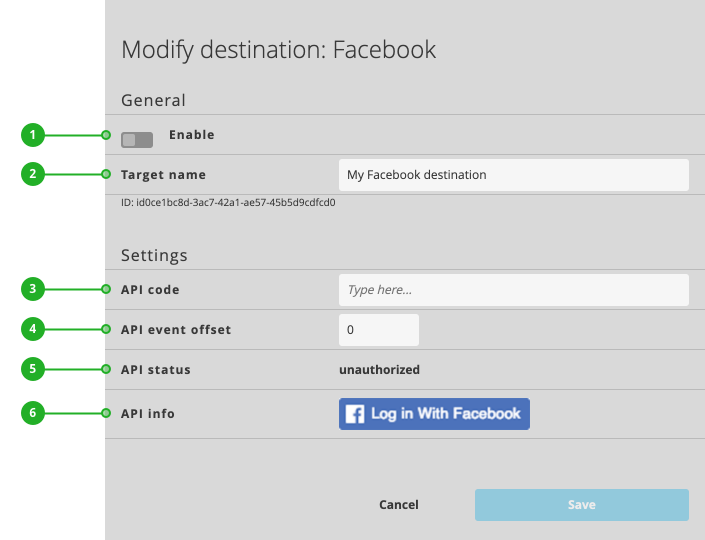
- Enable/Disable: Activates or deactivates the destination for publishing.
- Target name: As described above, the name of your destination.
- API code: Displays the authentication code once authentication is completed. You can also enter a valid API code from Facebook.
- API event offset: The offset duration in seconds between an API trigger and its desired execution on Facebook.
- API status: Displays the current authentication status.
- API info: Provides a link to initiate the authentication or provides detailed information on the current status of the authentication.
Continue with authenticating your destination.
2. Authenticate your destination
To authenticate your Facebook destination:
- Click the "Log in with Facebook". (see above: "API info" (6))
- Follow the instructions given by Facebook's authentication process. When asked, allow "LTN Schedule" access to the requested permissions.
- Receive a success message: "Your token has been successfully transmitted."
- You can close the window displaying the success message.
Continue with completing your configuration.
3. Complete your configuration
Once you have authenticated your destination, you can complete the configuration:
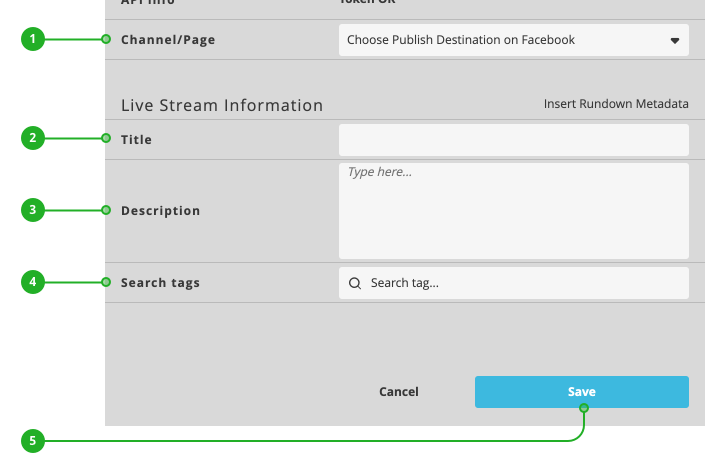
- Channel/Page: Select the page or channel on which you want to publish your live program.
- Title: Enter the title of your broadcast as it should appear on Facebook.
- Description: Add a description to go along with your published broadcast on Facebook.
- Search tags: Add search tags to be used alongside your Facebook broadcast.
Press "Save" (5) to save your changes. Your destination is now ready to use.
How to continue?
→ Learn to activate/deactivate your rundown.
→ Learn to turn on/off destinations.